
Facebook Video Downloader-Download Facebook videos online in HD quality
Video Downloader
Popular supported sites:
Facebook Video Downloader
Welcome to Vidsnap, a browser-based tool that helps you save publicly available Facebook videos without installing a separate app. The process is simple: copy the link to a supported public Facebook video, paste it into Vidsnap, process the link, and save whichever available result is presented — where supported, you can also choose between available quality options such as standard or HD before saving.
Vidsnap’s Facebook video downloader works directly in your browser on Android, iPhone, Windows, and Mac, so there’s nothing extra to set up just to try it. Whether you’re looking for a Facebook video downloader online, a quick way to save Facebook videos to your phone, or a browser-based Facebook video download tool for your desktop, the same basic copy-link, paste-link, process, and save workflow applies across devices.
What Is a Facebook Video Downloader?
A Facebook video downloader is a tool that takes the link to a public Facebook video and checks whether an available version of that video can be provided for you to save. Rather than screen recording the video as it plays, you provide the video’s URL directly, and the tool processes that link to look for a downloadable result.
With Vidsnap, this happens through your browser: you paste a supported Facebook video URL into the tool, it processes the link, and an available result — if one is found — is presented for you to review and save to your device.
This kind of tool is built around publicly viewable Facebook content, since that’s the type of video a link-based process can reasonably work with. It’s also worth remembering that being able to view or save a public video is a different matter from having permission to reuse it elsewhere — something we cover in more detail later on this page.
Why Use Vidsnap for Facebook Videos?
Vidsnap keeps its Facebook downloader focused on a practical set of features:
- 🌐 Browser-based — no separate app or extension needed to use the tool.
- 📱 Mobile-friendly — works in common mobile browsers on Android and iPhone.
- 🔗 Simple URL-based process — copy a supported Facebook video link and paste it in to begin.
- ⚙️ No complicated setup — no account creation required just to process a link.
- 💻 Works across supported desktop devices — the same browser-based process applies on Windows and Mac.
- 📲 Android/iPhone compatibility — accessible through supported mobile browsers on both platforms.
- 🎥 Supported Facebook videos — built around publicly available Facebook video content.
- 📁 Available download formats — presented based on what the source video supports.
- 🎯 Available quality options — choose from whatever results are offered for that particular video.
Processing time can vary depending on the video, your network connection, and current server conditions, so we won’t claim the process is always instant. Vidsnap also isn’t the only Facebook downloader available, and we don’t claim to be the fastest or the best without evidence to back that up — just a straightforward, browser-based option for public content.
How to Download a Facebook Video
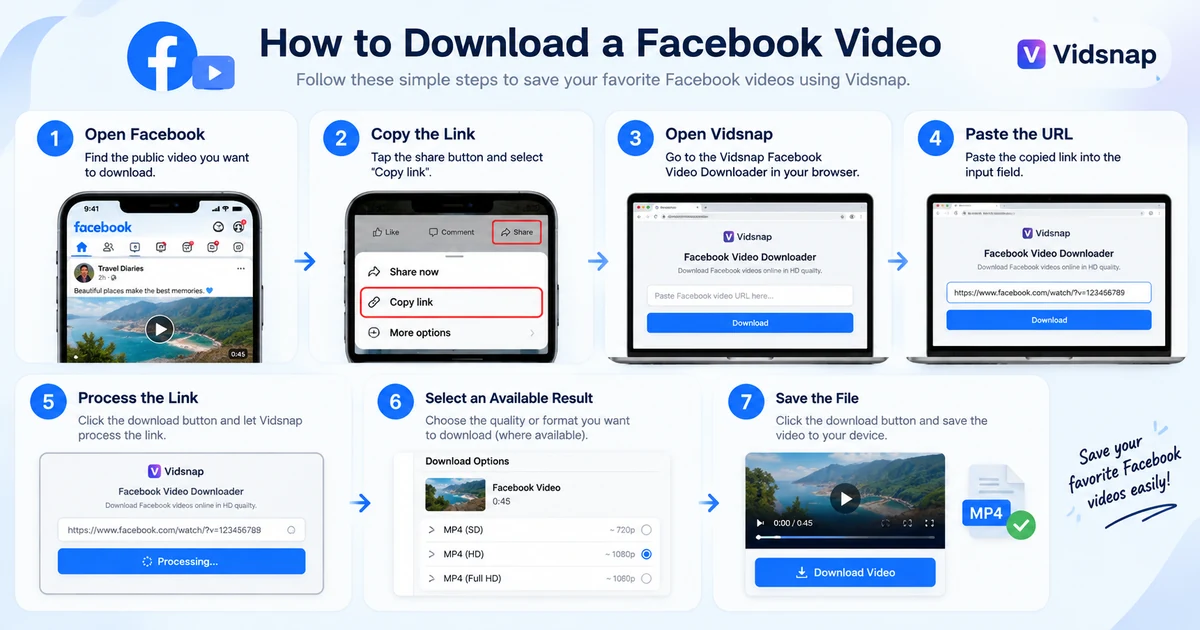
Saving a supported public Facebook video with Vidsnap follows the same basic steps on any device:
- 📱 Step 1: Open Facebook. Find the public video you want to save, either in the app or on the Facebook website.
- 🔗 Step 2: Copy the Video Link. Use Facebook’s Share option and choose the option that copies the video’s URL.
- 🌐 Step 3: Open Vidsnap. Go to the Vidsnap Facebook Video Downloader in your browser.
- 📋 Step 4: Paste the Facebook URL. Place the copied link into the downloader’s input field.
- ⚙️ Step 5: Process the Link. Press the available process/download action so Vidsnap can check the supported URL.
- 🎯 Step 6: Select an Available Quality or Format. If more than one result is offered, choose the option that suits your device.
- 💾 Step 7: Save the Video. Save the available file to your device’s storage or downloads folder.
Not every Facebook URL is guaranteed to return a result — availability depends on the video’s visibility and current platform conditions.
How to Download Facebook Videos on Android
Open the Facebook app and find the public video you’d like to save. Tap Share, then copy the video’s link. Switch to Chrome or another supported browser on your Android device, open Vidsnap, and paste the URL into the downloader. Process the link, select an available result, and save the video — it will usually be placed in your Downloads folder or your browser’s own download location.
A few common Android issues to watch for: some browsers require storage permission before a download will complete, an unstable network connection can interrupt processing, and an outdated browser may not handle the download properly. Videos that are private, deleted, or tied to an unsupported URL format won’t return a result regardless of device.
For a closer walkthrough of saving Facebook videos on mobile, see our Facebook downloader guide.
Read a BlogHow to Download Facebook Videos on iPhone
On iPhone, open the video in Facebook, tap Share, and copy the link. Open Safari or another supported browser, go to Vidsnap, and paste the URL into the downloader. After processing the link, select an available result to save it. Depending on your iOS version and browser settings, the file may save directly, appear in the Files app, or prompt you to choose a save location.
Behavior can vary slightly between iOS versions and browser apps, so if a download doesn’t land where you expect, checking your browser’s own downloads or file settings is usually the fastest way to find it.
How to Download Facebook Videos on PC and Mac
Open Facebook in your browser and locate the public video you want to save. Copy its URL from the video’s share menu or address bar, open Vidsnap, and paste the link into the downloader. Process the link, select an available result, and save the video to your computer — it will generally go to your browser’s default downloads folder.
This works the same way on Windows and Mac, since the process depends on your browser rather than your operating system. Chrome, Edge, and Firefox are commonly used on Windows, while Safari and Chrome are commonly used on Mac.
Download Facebook Videos in HD Quality
HD refers to a higher-resolution version of a video compared to standard definition. Not every Facebook video is uploaded or made available in HD, so the quality options you see when processing a link depend on how the original video was posted and what Facebook currently makes accessible for that content.
If an HD or higher-quality result is available for the supported video you’ve submitted, you can select that option before saving. When an HD version isn’t available, a standard-quality result may still be provided instead. We won’t claim that every Facebook video downloads in HD, since that depends entirely on the source.
Facebook Video Quality and Download Formats
Where supported, Vidsnap presents Facebook video results in standard MP4 format, with quality options such as standard definition, HD, or Full HD offered depending on the video. Available formats and resolutions can vary according to the original upload, what media Facebook currently makes available for that post, and Vidsnap’s current processing support.
We don’t promise a specific resolution for every link — some videos may only return one available option, while others may offer more than one to choose from.
How Does Vidsnap Facebook Downloader Work?
At a basic level, the process follows this sequence: you provide a supported Facebook video URL, Vidsnap processes that link, available media information is retrieved, and a downloadable result is presented for you to select and save.
We keep this explanation general rather than detailing backend mechanics, since Facebook’s own platform changes over time and can affect whether a particular URL is processable at any given moment.
Supported Devices and Browsers
Vidsnap’s Facebook downloader is built to run in modern browsers across these common device types:
| Device | Browser | Support |
|---|---|---|
| Android | Chrome and other supported mobile browsers | ✓ |
| iPhone | Safari and other supported browsers | ✓ |
| Windows | Chrome, Edge, Firefox | ✓ |
| Mac | Safari, Chrome | ✓ |
| Tablet | Supported mobile browsers | ✓ |
Why Isn’t My Facebook Video Downloading?
If a link isn’t returning a result, a few common causes are usually behind it:
- The URL was copied incorrectly or is incomplete.
- The video belongs to a private profile, closed group, or has restricted visibility.
- The original post has been deleted or taken down since the link was copied.
- The specific URL format isn’t currently supported.
- Facebook has made a platform change that temporarily affects processing.
- A temporary service issue is affecting the downloader.
- Your network connection is unstable or blocking the request.
- Your browser is out of date or blocking part of the download.
Re-copying the link directly from Facebook and confirming the video is still public resolves many of these cases.
Facebook Downloader Troubleshooting
Invalid Facebook Link
Go back to Facebook and copy the link again using the Share option rather than typing or editing the URL manually. A single missing character can cause the link to be read as invalid.
Download Button Not Working
Refresh the Vidsnap page, confirm your browser is up to date, and check your network connection before trying again.
Video Not Found
Confirm that the original post is still public. Videos that have been deleted, made private, or restricted after the link was copied will no longer return a result.
Download Is Slow
Processing time can vary depending on your network speed, the source video, file size, and temporary server load. A slower result doesn’t necessarily indicate a problem with the link itself.
Downloaded File Won’t Play
Try opening the file in a different media player or browser, and confirm the download finished completely. Incomplete downloads or unsupported player software are the most common causes.
Which Facebook Video Links Can You Use?
Vidsnap is built around processing specific, supported Facebook URL types, which may include:
- Public Facebook video post URLs
- Supported Facebook Watch links
- Supported public page video URLs
- Other public video URL formats currently supported by the tool
If a link type hasn’t been tested or currently supported, it may not return a result even if the underlying video is publicly visible.
Can You Download Private Facebook Videos?
No. Vidsnap’s Facebook downloader is intended for publicly available videos only. Content from private profiles, closed groups, or restricted posts is not supported, and the tool does not include any method for bypassing Facebook’s privacy settings.
Please respect other people’s privacy choices on Facebook. If a video has been shared privately or within a closed group, that’s a deliberate setting made by the person who posted it.
Copyright and Responsible Use
Most videos posted to Facebook are protected by copyright, and public visibility doesn’t remove that protection. Being able to view or save a video is different from having the right to reuse, repost, or redistribute it elsewhere.
If you’d like to use someone else’s video beyond personal, private viewing — for example, reposting it publicly or using it commercially — you may need explicit permission from the original creator. Crediting the original source is good practice, but it doesn’t automatically replace the need for permission.
Vidsnap does not transfer copyright ownership of any video it processes, and using the tool doesn’t grant additional rights beyond what copyright law and Facebook’s own terms already allow. Please follow applicable laws and platform rules when deciding how to use any video you save.
Is Vidsnap Affiliated with Facebook?
No. Vidsnap is an independent, third-party service and is not affiliated with, endorsed by, sponsored by, or officially connected to Facebook or Meta in any way. Facebook and related trademarks belong to their respective owners.
Privacy and Security
Using Vidsnap does not require your Facebook username or password. We’d recommend never entering social media login credentials into any third-party downloader tool, including this one — Vidsnap only needs the public URL of the video you want to process.
The tool works by taking the link you provide and checking it for an available result; it does not require account access to do this. Like many websites, Vidsnap may use standard cookies, basic analytics, or server logs to help the site function and to understand general usage patterns.
For more detail on how information is handled, see our Privacy Policy.
Browser-Based Facebook Downloading vs Apps
Browser-based tools and separate downloader apps each come with their own trade-offs:
| Consideration | Browser-Based Downloader | Separate App |
|---|---|---|
| Installation | Not required | Requires installing and setting up an app |
| Browser access | Works directly in your existing browser | Depends on the app’s own interface |
| Device compatibility | Generally consistent across devices with a modern browser | May be limited to specific operating systems |
| Updates | Updated on the website itself | Requires app updates through a store |
| Convenience | No extra storage used for an app | Uses device storage for the app itself |
When Can a Facebook Video Downloader Be Useful?
There are several everyday, responsible reasons someone might want to save a public Facebook video:
- Saving a copy of your own posted videos
- Keeping personal offline reference copies
- Backing up your own content
- Research or reference use where permitted
- Educational use where permitted
- Preparing your own footage for further editing
These are common, practical use cases — they don’t, on their own, grant permission to reuse someone else’s copyrighted video beyond personal viewing.
Vidsnap and Other Facebook Downloader Options
Vidsnap isn’t the only Facebook downloader available, and other services can vary in the formats they support, how they process links, what content they can currently handle, their privacy practices, and their overall interface. Vidsnap also offers browser-based downloaders for other platforms, including our TikTok video downloader and Instagram video downloader. We’d encourage you to review any tool’s privacy information and responsible-use guidance before relying on it.
More Facebook Guides
Vidsnap Facebook Video Downloader Guide — a closer look at saving Facebook videos step by step across devices.
Read a BlogMore Video Downloaders
Looking to save video from other platforms? Vidsnap also offers:
TikTok Video Downloader — a similar browser-based process for supported public TikTok videos.
Try DownloaderInstagram Video Downloader — a browser-based tool for supported public Instagram videos and Reels.
Try DownloaderFrequently Asked Questions
What is a Facebook video downloader?
A Facebook video downloader is a tool that processes a link to a publicly available Facebook video and checks for a version of that video you can save to your device. Vidsnap is a browser-based example, working through your web browser rather than a separate app.
How do I download a Facebook video with Vidsnap?
Copy the link to a supported public video using Facebook’s Share option, open Vidsnap in your browser, and paste the link into the downloader. Process the link, then select and save whichever available result is presented. The same basic process applies across Android, iPhone, Windows, and Mac.
Can I download Facebook videos on Android?
Yes. Copy the video’s link from the Facebook app, open Vidsnap in a supported Android browser, paste the URL, and process it. Once an available result appears, save it to your device — it will typically be placed in your Downloads folder.
Can I download Facebook videos on iPhone?
Yes. Copy the link from Facebook, open Vidsnap in Safari or another supported browser, and paste the URL into the downloader. After processing, select an available result to save. Where the file ends up can depend on your iOS version and browser settings.
Do I need to install an app to use Vidsnap?
No separate app is required. Vidsnap runs directly in your browser, so you can process a supported Facebook video link on Android, iPhone, Windows, or Mac without installing additional software.
Can I download Facebook videos in HD?
If an HD or higher-quality result is available for the supported video you’ve submitted, you can select that option before saving. Not every Facebook video is available in HD, since this depends on how it was originally uploaded and what Facebook currently makes accessible.
Can I download videos from a private Facebook profile or group?
No. Vidsnap is intended for publicly available Facebook videos only. Private profiles and closed groups are not supported, and the tool includes no method for bypassing Facebook’s privacy settings.
What video quality is available?
Available quality depends on the original upload and current platform conditions, with options like standard definition or HD offered where supported. Higher resolutions aren’t guaranteed for every video, since availability varies by source.
Why isn’t my Facebook link working?
Common causes include an incorrectly copied URL, private or restricted content, a deleted post, an unsupported link format, or a temporary service or network issue. Re-copying the link directly from Facebook and confirming the video is still public resolves many cases.
Where is my downloaded Facebook video saved?
This depends on your device and browser. On most devices, saved videos are placed in your browser’s default Downloads folder, though some mobile browsers may prompt you to choose a location or sort files differently.
Is Vidsnap affiliated with Facebook?
No. Vidsnap is an independent third-party service and is not affiliated with, endorsed by, sponsored by, or officially connected with Facebook or Meta. All Facebook trademarks belong to their respective owners.
Is it legal to download Facebook videos?
This depends on the content and how you intend to use it. Saving publicly available video for personal, private use is generally different from redistributing or commercially using someone else’s copyrighted work without permission. When in doubt, respect the original creator’s rights and applicable laws in your location.
Download Facebook Videos with Vidsnap
Saving a supported public Facebook video with Vidsnap generally comes down to a few simple steps:
- Copy a supported Facebook video URL.
- Open Vidsnap in your browser.
- Paste the URL into the downloader.
- Process the link.
- Select an available result.
- Save the file to your device.
- Use the video responsibly, respecting the rights of the original creator.
You can also visit the Vidsnap homepage to explore the other browser-based downloaders available on the site.