
TikTok Video Downloader
Download TikTok Videos Without Watermark
Video Downloader
Popular supported sites:
Welcome to Vidsnap, a browser-based tool built for anyone who wants a straightforward way to save a TikTok clip they already have the right to view. This page covers how the TikTok video downloader works, what happens when you paste in a link, and how the process looks slightly different depending on whether you’re on Android, iPhone, Windows, or Mac.
The workflow itself is short: copy the link to a public TikTok video, paste that link into Vidsnap, let the page process it, and then pick whichever download result comes back as available. There’s nothing to install first — Vidsnap runs in your existing mobile or desktop browser, so a TikTok video downloader for Android works the same basic way as one used on a laptop. Whether you’re trying to download TikTok videos on PC, save something quickly from an iPhone, or just want an online TikTok downloader you can bookmark, the steps below apply across devices.
What Is a TikTok Video Downloader?
A TikTok video downloader is a tool that takes a video’s URL and returns a file you can save directly to your device, instead of relying on TikTok’s in-app viewer. You copy the link to a public TikTok video, submit it to the downloader, and the tool attempts to prepare an available version of that video for saving.
This matters because TikTok’s own app doesn’t always make it obvious how to keep a permanent, offline copy of a video — particularly one you posted yourself or one a creator has shared for saving. An online downloader fills that gap by handling the technical side: reading the link, checking what TikTok currently exposes for that video, and presenting whatever result is available.
One thing worth knowing upfront: what’s “available” can shift over time. TikTok periodically updates its site structure, and any downloader — Vidsnap included — has to adapt to those changes. If a video suddenly won’t process, it’s often a sign that something changed on TikTok’s end rather than a permanent limitation.
Why Use Vidsnap for TikTok Videos?
- 🎯 Simple interface — paste a link, get a result, without extra steps or confusing menus.
- 🌐 Browser-based access — works through your existing browser rather than a separate application.
- 📱 Mobile-friendly layout — the page is built to be usable on a phone screen, not just desktop.
- ⚙️ No complicated setup — there’s no account creation or configuration required to try it.
- 🎥 MP4 output where supported — downloaded files are provided in a widely compatible format when the source video allows it.
- 🖥️ Available quality options — where TikTok exposes more than one version of a video, Vidsnap will surface what it can.
- 💻 Cross-device usability — the same tool works whether you’re on a phone, tablet, or computer, since it’s all browser-based.
None of this makes Vidsnap the only option out there, and it isn’t positioned as flawless — TikTok’s own platform behavior is the biggest variable in how consistently any downloader performs.
How to Download a TikTok Video
These steps describe the general process for saving a public TikTok video using Vidsnap.
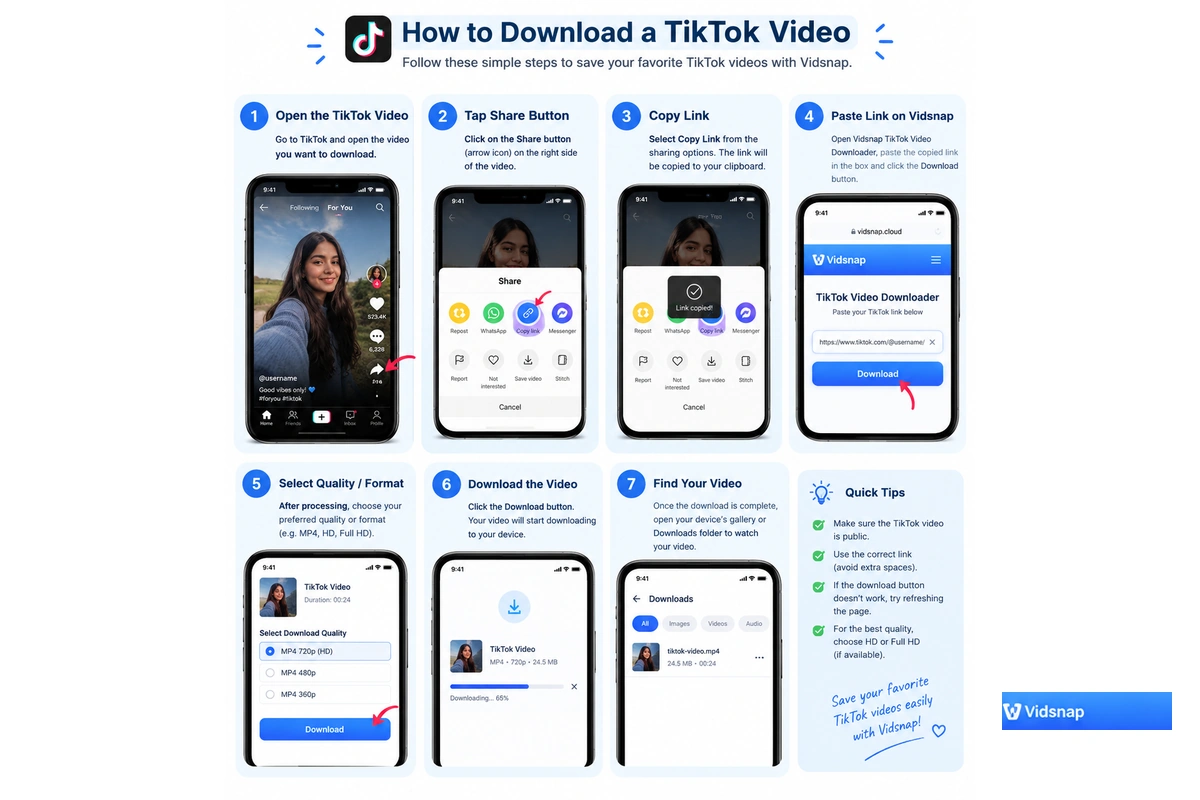
📱 Step 1: Open the TikTok video
Find the public video you want to save, either inside the TikTok app or through a browser version of the site.
🔗 Step 2: Tap the Share button
Below the video, there’s a Share icon (usually an arrow) that opens a menu of sharing options.
📋 Step 3: Select Copy Link
From the share menu, choose Copy Link. This places the video’s URL onto your device’s clipboard.
🌐 Step 4: Open Vidsnap and paste the URL
Go to Vidsnap in your browser and paste the copied link into the input field on the TikTok downloader page.
⚙️ Step 5: Start the download process
Submit the link so Vidsnap can process it. This step checks what’s currently available for that specific video.
🎥 Step 6: Choose an available quality or format
If more than one version of the video is available, select the one that best fits your needs — options can vary depending on the source video.
⬇️ Step 7: Save the video
Once you select a result, your browser will handle saving the file to your device’s default download location.
How to Download TikTok Videos on Android
Downloading TikTok videos on Android follows the same basic pattern as above, with a couple of Android-specific notes:
- Open TikTok and find the video you want.
- Tap Share, then Copy Link.
- Open Chrome or another browser installed on your Android device.
- Visit Vidsnap and paste the TikTok URL into the field.
- Let the page process the video.
- Select an available result.
- Save the file to your device.
On most Android phones, downloaded files land in a Downloads folder, though the exact name and location can vary between manufacturers and browsers. If a download seems stuck, common culprits include browser storage permissions, low free space, an unstable connection, or a video that’s no longer available at the source.
How to Download TikTok Videos on iPhone
On iPhone, the process runs through Safari or Chrome rather than a separate app:
- Open the TikTok video, tap Share, then Copy Link.
- Open Safari or Chrome on your iPhone.
- Go to Vidsnap and paste the link.
- Start the download process.
- Choose an available result.
Downloaded files on iOS are typically accessible through the Files app, under the Downloads location — though this can shift slightly depending on iOS version and which browser you used. It’s worth noting that files generally save to Files rather than directly into your Photos library.
How to Download TikTok Videos on PC and Mac
To download TikTok videos on PC or Mac, open TikTok through your browser rather than an app:
- Go to the public video on tiktok.com.
- Copy the video’s URL from the address bar or the Share menu.
- Open Vidsnap in a new tab.
- Paste the link and process it.
- Choose an available download option.
- Save the file to your computer.
On Windows, browsers like Chrome and Edge generally send downloads to a Downloads folder by default, viewable from File Explorer. On Mac, Safari and Chrome typically save to the Downloads folder as well, accessible from Finder. Firefox users on either platform can usually check their browser’s own download history for the exact save location.
Download TikTok Videos Without Watermark
TikTok’s default video export includes a small watermark — typically the TikTok logo and the creator’s username overlaid near a corner of the frame. Some people prefer a cleaner copy, whether for personal archiving or for editing footage they have permission to reuse.
When the current downloader and the specific source video support it, Vidsnap can return a version without that overlay. This isn’t guaranteed for every single video, resolution, or link format — TikTok controls what’s technically exposed for each upload, and that can vary from clip to clip.
It’s worth being clear about one thing: removing a watermark doesn’t change who owns the video. A watermark-free copy is still the creator’s work, and downloading it doesn’t hand over any rights to republish, monetize, or repost that content elsewhere. For a closer look at how this works, see the detailed guide on downloading TikTok videos without watermark.
TikTok Video Quality and Download Formats
Downloaded files from Vidsnap are generally provided as MP4, since it’s the most broadly compatible video format across phones, computers, and media players. Beyond that, available quality depends heavily on what TikTok exposes for a given video — some clips offer a higher-resolution version, while others may only have a single standard option.
Vidsnap doesn’t promise 4K downloads across the board. If a source video and the current backend both support a higher resolution, that option may appear; if not, the standard available quality is what you’ll get. The safest way to know what’s on offer for a specific clip is simply to process its link and see which options come back.
How Does Vidsnap TikTok Downloader Work?
At a basic level, the process looks like this:
- You provide a TikTok video URL.
- Vidsnap processes that URL to check what’s currently available.
- The available video information is prepared and shown to you.
- You select the download option you want to save.
There’s no need to know the technical details behind this to use it — the important part is that the result depends on what TikTok currently makes accessible for that specific video link.
Supported Devices and Browsers
| Device | Browser | Support |
|---|---|---|
| Android | Chrome | ✓ |
| iPhone | Safari / Chrome | ✓ |
| Windows | Chrome / Edge / Firefox | ✓ |
| Mac | Safari / Chrome | ✓ |
Browser behavior and TikTok’s own page structure can change over time, so occasional inconsistencies are possible even on a generally supported combination.
Why Isn’t My TikTok Video Downloading?
- Incorrect URL: the link may have been copied incompletely or from the wrong source.
- Private video: content set to private isn’t accessible to outside tools.
- Deleted video: if the creator removed the clip, no downloader can retrieve it.
- Platform changes: TikTok periodically updates its site, which can temporarily affect processing.
- Unsupported URL type: some link formats aren’t recognized by the current backend.
- Temporary service issue: occasional load or maintenance on Vidsnap’s side.
- Browser problems: outdated browsers or blocked permissions can interfere.
- Network issues: a weak or interrupted connection can stop processing partway through.
- Regional or content restrictions: some videos are limited by the creator or by platform policy in certain regions.
None of these point to a way around content restrictions — if a video is private or restricted, that’s a deliberate choice by the creator or platform, and it should be respected.
TikTok Downloader Troubleshooting
Invalid TikTok Link
Go back to the TikTok app or site, open the video again, and use Share → Copy Link to get a fresh URL, rather than typing or editing the link by hand.
Download Button Not Working
Try refreshing the page, clearing your browser’s cache, checking your connection, and submitting the link again. Switching browsers can also help rule out a browser-specific issue.
Video Not Found
Confirm the video is still public and hasn’t been deleted or set to private since you copied the link.
Download Is Slow
Speed can be affected by your own internet connection, current server load, the video’s file size, or how TikTok is currently serving that particular clip. It isn’t something Vidsnap can guarantee is fast in every case.
Downloaded File Won’t Play
Make sure you’re opening the file in an up-to-date, standard media player. Most modern players handle MP4 without issue, but very old software occasionally struggles with newer encoding.
Which TikTok Links Can You Use?
Vidsnap is built around standard TikTok video links — the kind of URL you get from a video’s Share → Copy Link option, including both full-length links and TikTok’s shortened share URLs.
Not every link type is guaranteed to work. Profile links, slideshow-style posts, and other non-standard formats aren’t necessarily supported, and this can change as TikTok updates its platform. If a link doesn’t process, double-check that it points directly to a single, public video.
Can You Download Private TikTok Videos?
No — private and restricted TikTok content is not something Vidsnap is designed to access, and it shouldn’t be. There’s an important difference between a publicly viewable video and one a creator has deliberately restricted to specific followers or approved viewers.
Attempting to bypass those restrictions isn’t something this tool supports, and doing so elsewhere would raise both privacy and platform-policy concerns. If a video isn’t publicly accessible, the right move is to respect that setting rather than look for a workaround.
Copyright and Responsible Use
Most TikTok videos are protected by copyright the moment they’re created, and that protection stays with the original creator or rightsholder even after a video is downloaded. Saving a file to your device is not the same as receiving permission to reuse it.
Reposting, editing for commercial purposes, or redistributing someone else’s TikTok video generally requires separate permission from the creator, and different countries handle fair-use type exceptions differently. Crediting the original creator is good practice, but it doesn’t automatically substitute for that permission.
When in doubt, it’s worth reaching out to the creator directly before reusing their content anywhere beyond personal, offline viewing.
Is Vidsnap Affiliated with TikTok?
No. Vidsnap is an independent third-party service and is not affiliated with, endorsed by, sponsored by, or officially connected with TikTok, ByteDance, Instagram, Meta, or their respective owners. TikTok and ByteDance are trademarks belonging to their respective companies, referenced here only to describe compatibility, not any partnership.
Privacy and Security
Using Vidsnap doesn’t require a TikTok account, username, or password — the tool works from a public video URL alone, and you should never be asked to enter TikTok login credentials anywhere on this site. Treat any page that does ask for your TikTok password as suspicious, regardless of how it’s branded.
Like most websites, Vidsnap may use basic cookies or analytics to understand how the site is used. For full details on what’s collected and how it’s handled, see the Vidsnap Privacy Policy.
Browser-Based TikTok Downloading vs Apps
| Browser Downloader | Separate App |
|---|---|
| No installation needed | Requires installation |
| Works through any modern browser | Usually tied to a specific device or OS |
| Quick to access from anywhere | May require periodic updates |
| Works across most devices with a browser | May be limited to certain app stores or regions |
Neither approach is inherently better in every situation — a browser tool trades some convenience for not needing anything installed, while a dedicated app might offer extra features at the cost of setup and updates.
When Can a TikTok Downloader Be Useful?
- Keeping a personal, offline copy of a video for later viewing.
- Backing up your own TikTok uploads in case they’re ever removed or lost.
- Referencing a clip for research, note-taking, or educational purposes where permitted.
- Preparing footage you own or have permission to use for legitimate editing.
- Sharing a video through appropriate, permitted channels rather than reposting without consent.
Whatever the reason, it’s worth keeping copyright and creator permission in mind before using a downloaded video anywhere beyond private, personal viewing.
Vidsnap Alternatives: SSSTik, SnapTik, SaveFrom and TikTokDownloader
Vidsnap isn’t the only online TikTok downloader available — services like SSSTik, SnapTik, SaveFrom, and TikTokDownloader occupy similar ground, and it’s reasonable to compare a few before settling on one. Features, supported link types, output quality, speed, and privacy practices can all differ between these tools, and results can vary depending on which specific video you’re trying to save.
Rather than claiming to be objectively better than every alternative, Vidsnap’s focus is on keeping the process browser-based, quick to access from any device, and centered on a simple URL-in, video-out workflow — without requiring an account or app installation. If you try more than one downloader, it’s worth judging each on how it performs with the videos you actually care about saving.
More TikTok Download Guides
If you want a deeper look at removing watermarks, saving on a specific device, or understanding how TikTok’s algorithm has shifted in 2026, these guides go further than this overview page can:
- Downloading TikTok videos without a watermark — a closer look at how clean copies work and when they’re available.
- TikTok video downloading on Android in depth — device-specific tips and common fixes.
- Saving TikTok videos on iPhone and iOS — how the process differs from Android and where files end up.
- How TikTok’s algorithm works in 2026 — useful context if you’re saving videos for content research.
More Video Downloaders
Vidsnap also supports a couple of other major platforms, in case you need to save video from more than just TikTok:
- Instagram Video Downloader — save public Reels and videos from Instagram using the same browser-based approach.
- Facebook Video Downloader — download public Facebook videos with a similar copy-paste-process workflow.
Frequently Asked Questions
What is a TikTok video downloader?
It’s a tool that takes a public TikTok video’s URL and prepares a downloadable file from it, so you can save the video to your device instead of only being able to view it inside the TikTok app.
How do I download a TikTok video?
Copy the video’s link from TikTok’s Share menu, paste it into Vidsnap, let the page process the link, then choose an available result to save. The whole process works directly in your browser, without any installation.
Can I download TikTok videos on Android?
Yes. Open the video in TikTok, copy its link, then open Chrome or another Android browser, visit Vidsnap, paste the link, and process it. Downloaded files typically appear in your device’s Downloads folder.
Can I download TikTok videos on iPhone?
Yes, using Safari or Chrome. Copy the video link from TikTok’s Share menu, paste it into Vidsnap, and process it. On iOS, saved files are generally accessible through the Files app.
Can I download TikTok videos without a watermark?
Often, yes — when the current downloader and the specific source video support it. This isn’t guaranteed for every single clip, since it depends on what TikTok exposes for that video at the time.
Do I need to install an app?
No. Vidsnap works directly through your existing mobile or desktop browser, so there’s nothing to download or install before you can use the TikTok downloader.
Why isn’t my TikTok link working?
Common causes include an incomplete or incorrect link, a private or deleted video, a temporary platform change on TikTok’s side, or a browser or network issue. Copying a fresh link directly from Share → Copy Link usually resolves most cases.
Can I download private TikTok videos?
No. Vidsnap only works with publicly accessible videos, and it’s not designed to bypass privacy settings. Private content should stay private, in line with the creator’s own choice.
What video format does Vidsnap support?
Downloaded TikTok videos are generally provided as MP4 files, since that format is broadly compatible with most phones, computers, and media players.
Where is my downloaded TikTok video saved?
It depends on your device and browser. On most phones and computers, it lands in a default Downloads folder — accessible via Files on iPhone, Downloads on Android, or your browser’s download history on desktop.
Is Vidsnap affiliated with TikTok?
No. Vidsnap is an independent, third-party tool and has no official partnership, endorsement, or connection with TikTok, ByteDance, or their affiliated brands.
Is it legal to download TikTok videos?
Saving a public video for personal, offline viewing is generally low-risk, but the video itself remains protected by copyright. Reposting, editing for commercial use, or redistributing someone else’s content typically requires their permission first.
Download TikTok Videos with Vidsnap
Saving a TikTok video comes down to a short sequence: copy the video’s URL, open Vidsnap, paste the link, let it process, choose an available quality or format, and save the result to your device. The exact experience can vary slightly by device — Android, iPhone, Windows, and Mac each have their own quirks around where files end up — but the core steps stay the same.
Whatever you save, it’s worth using it responsibly: for personal viewing, backing up your own content, or other permitted purposes, while keeping the original creator’s rights in mind.
Copyright and Responsible Use
Vidsnap is an independent video downloading tool. Users should only download videos they own or have permission to download or reuse. Downloading a video does not transfer copyright ownership or permission to republish it. Please respect the rights of content creators and the terms of the platforms you use.